
AI
AstrBot provides built-in support for multiple Large Language Model (LLM) providers and offers a unified interface, making it convenient for plugin developers to access various LLM services.
You can use the LLM / Agent interfaces provided by AstrBot to implement your own intelligent agents.
Starting from version v4.5.7, we've made significant improvements to the way LLM providers are invoked. We recommend using the new approach, which is more concise and supports additional features. The legacy invocation method remains documented in the previous Chinese-only guide.
Getting the Chat Model ID for the Current Session
TIP
Added in v4.5.7
umo = event.unified_msg_origin
provider_id = await self.context.get_current_chat_provider_id(umo=umo)
Invoking Large Language Models
TIP
Added in v4.5.7
llm_resp = await self.context.llm_generate(
    chat_provider_id=provider_id,  # Chat model ID
    prompt="Hello, world!",
)
# print(llm_resp.completion_text) # Get the returned text
Structured Decisions
A Decision Provider handles low-latency structured choices, such as whether to reply, which message to answer, or which branch to execute. Configure one under Providers → Decision in the WebUI, then call it from a plugin through self.context.decision. It is independent of the chat model.
One request can answer multiple questions. state is passed to the decision model as-is and must be a str, list, or dict:
from astrbot.api.provider import (
    DecisionBooleanQuestion,
    DecisionChoiceAnswer,
    DecisionChoiceQuestion,
    DecisionScoreQuestion,
)


recent_messages = [
    {"role": "user", "content": "I cannot log in; every request returns 500."},
]

answers = await self.context.decision.ask(
    {
        "should_reply": DecisionChoiceQuestion(
            instructions="Should the assistant reply to this message?",
            criteria={"reply": "Reply now", "ignore": "Stay silent"},
        ),
        "target": DecisionChoiceQuestion(
            instructions="Which message should the reply focus on?",
            criteria={"latest": "Latest message", "previous": "Previous message"},
        ),
        "needs_tool": DecisionBooleanQuestion(
            "Does this request require a tool call?"
        ),
        "severity": DecisionScoreQuestion(
            instructions="How severe is the reported problem?",
            criteria=[
                "No impact on normal use",
                "Some features fail, but a workaround exists",
                "Core features are unavailable with no workaround",
            ],
        ),
    },
    state={"messages": recent_messages},
)

should_reply = answers["should_reply"]
if (
    isinstance(should_reply, DecisionChoiceAnswer)
    and should_reply.choice == "reply"
    and should_reply.probability >= 0.7
):
    target = answers["target"]
    # Use target.choice and answers["needs_tool"].probability in later logic
DecisionChoiceQuestion.criteria maps option IDs to descriptions and corresponds to criteria in the System One request. For choice questions, choice is the selected option ID, probabilities contains the full distribution, and confidence is the model confidence. For boolean questions, probability is the probability that the statement is true. Business rules such as proactive-reply thresholds remain the caller's responsibility.
Results use three independent frozen dataclasses: DecisionChoiceAnswer, DecisionBooleanAnswer, and DecisionScoreAnswer. DecisionAnswer is their union type. After calling ask(), use isinstance() to identify the result type before accessing its fields. choose() returns DecisionChoiceAnswer, while yes_no() returns bool.
DecisionScoreQuestion.criteria is a list of 2–10 string levels, ordered from lowest to highest and numbered from 0. DecisionScoreAnswer.score is a probability-weighted rating, possibly fractional, from 0 to len(criteria) - 1. Both legend and probabilities use string level numbers such as "0" as keys, mapping to descriptions and probabilities; confidence reports certainty. A score answer contains only these four fields. All three question types can be mixed in one ask() call.
Use the convenience methods for a single question:
choice = await self.context.decision.choose(
    question="Which reply strategy should be used?",
    criteria={"short": "A brief reply", "detailed": "A detailed reply"},
    state=recent_messages,
)

should_reply = await self.context.decision.yes_no(
    question="Should the assistant reply now?",
    state=recent_messages,
    threshold=0.7,
)
Pass provider_id="provider_id" to use a specific configured decision provider; otherwise the default one is used. DecisionError is raised for an unconfigured provider, timeout, connection failure, HTTP error, invalid JSON, or an answer outside the requested contract. Underlying details are written to the AstrBot log, so plugins can catch the exception and decide whether to skip or degrade this decision.
Defining Tools
Tools enable large language models to invoke external capabilities.
from pydantic import Field
from pydantic.dataclasses import dataclass

from astrbot.core.agent.run_context import ContextWrapper
from astrbot.core.agent.tool import FunctionTool, ToolExecResult
from astrbot.core.astr_agent_context import AstrAgentContext


@dataclass
class BilibiliTool(FunctionTool[AstrAgentContext]):
    name: str = "bilibili_videos"  # Tool name
    description: str = "A tool to fetch Bilibili videos."  # Tool description
    parameters: dict = Field(
        default_factory=lambda: {
            "type": "object",
            "properties": {
                "keywords": {
                    "type": "string",
                    "description": "Keywords to search for Bilibili videos.",
                },
            },
            "required": ["keywords"],
        }
    )

    async def call(
        self, context: ContextWrapper[AstrAgentContext], **kwargs
    ) -> ToolExecResult:
        return "1. Video Title: How to Use AstrBot\nVideo Link: xxxxxx"
Registering Tools with AstrBot
Once a Tool is defined, if you want it to be automatically invoked during user conversations, register it in your plugin's __init__ method:
class MyPlugin(Star):
    def __init__(self, context: Context):
        super().__init__(context)
        # >= v4.5.1:
        self.context.add_llm_tools(BilibiliTool(), SecondTool(), ...)

        # < v4.5.1:
        tool_mgr = self.context.provider_manager.llm_tools
        tool_mgr.func_list.append(BilibiliTool())
WARNING
context.register_llm_tool() is deprecated. Do not use it in new plugins.
If you must use it for legacy compatibility, func_args must be a list of dicts in this format:
func_args = [{"type": "string", "name": "arg_name", "description": "..."}, ...]Passing a list of strings or any other format will raise AttributeError: 'str' object has no attribute 'pop'.
Registering Tools via Decorator
Alternatively, you can use the @filter.llm_tool decorator to define and register a tool in one step. Make sure to follow the exact format below, including the docstring — AstrBot parses the docstring to generate the parameter schema:
@filter.llm_tool(name="get_weather") # If name is omitted, the function name is used
async def get_weather(
self, event: AstrMessageEvent, location: str
) -> MessageEventResult:
"""Get weather information.
In location(string): The location to query, location is the parameter name, string is the type, and the remainder is the description.
Supported types: string, number, object, boolean, array. Since v4.5.7, array subtypes are supported, e.g. array[string].
WARNING
The Args: block is required and must be formatted correctly.
The @filter.llm_tool decorator generates the parameter schema by parsing the function's docstring — it does not read Python type annotations. If the docstring is missing an Args: block, or the format does not follow param_name(type): description, the generated schema will be empty. Any arguments passed by the LLM will be silently dropped, causing the function to fail with a missing-argument error.
Additionally, passing parameters=... directly to the decorator is not supported and will be silently ignored. If you need manual control over the schema, use the @dataclass + add_llm_tools() approach above.
Invoking Agents
TIP
Added in v4.5.7
An Agent can be defined as a combination of system_prompt + tools + llm, enabling more sophisticated intelligent behavior.
After defining the Tool above, you can invoke an Agent as follows:
llm_resp = await self.context.tool_loop_agent(
    event=event,
    chat_provider_id=prov_id,
    prompt="Search for videos related to AstrBot on Bilibili.",
    tools=ToolSet([BilibiliTool()]),
    max_steps=30,  # Maximum agent execution steps
    tool_call_timeout=120,  # Tool invocation timeout
)
# print(llm_resp.completion_text) # Get the returned text
tool_loop_agent() method automatically handles the loop of tool invocations and LLM requests until the model stops calling tools or the maximum number of steps is reached.
Multi-Agent
TIP
Added in v4.5.7
Multi-Agent systems decompose complex applications into multiple specialized agents that collaborate to solve problems. Unlike relying on a single agent to handle every step, multi-agent architectures allow smaller, more focused agents to be composed into coordinated workflows. We implement multi-agent systems using the agent-as-tool pattern.
In the example below, we define a Main Agent responsible for delegating tasks to different Sub-Agents based on user queries. Each Sub-Agent focuses on specific tasks, such as retrieving weather information.
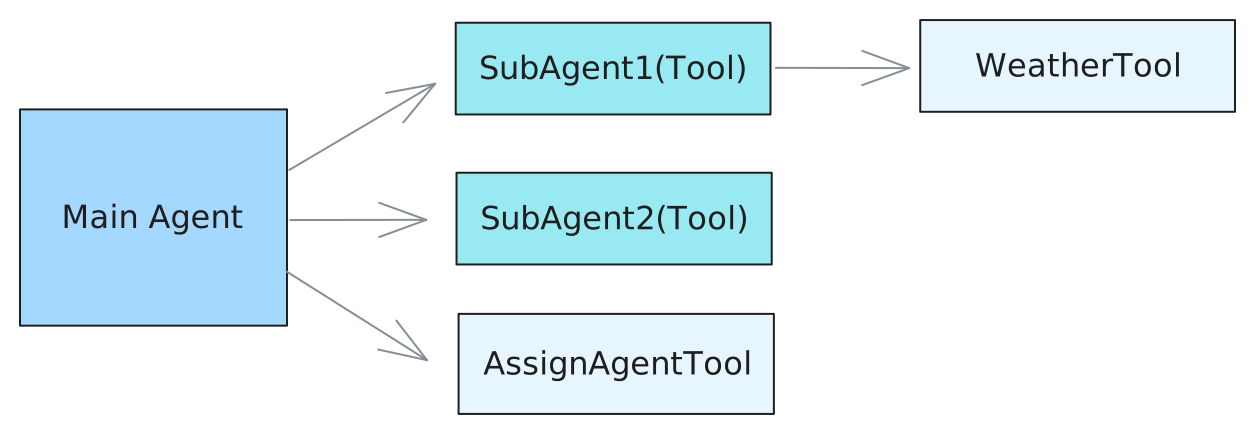
Define Tools:
from astrbot.api import logger
from astrbot.core.agent.run_context import ContextWrapper
from astrbot.core.agent.tool import FunctionTool, ToolExecResult, ToolSet
from astrbot.core.astr_agent_context import AstrAgentContext
from pydantic import Field
from pydantic.dataclasses import dataclass


@dataclass
class AssignAgentTool(FunctionTool[AstrAgentContext]):
    """Main agent uses this tool to decide which sub-agent to delegate a task to."""

    name: str = "assign_agent"
    description: str = "Assign an agent to a task based on the given query"
    parameters: dict = Field(
        default_factory=lambda: {
            "type": "object",
            "properties": {
                "query": {
                    "type": "string",
                    "description": "The query to call the sub-agent with.",
                },
            },
            "required": ["query"],
        }
    )

    async def call(
        self, context: ContextWrapper[AstrAgentContext], **kwargs
    ) -> ToolExecResult:
        # Here you would implement the actual agent assignment logic.
        # For demonstration purposes, we'll return a dummy response.
        return "Based on the query, you should assign agent 1."


@dataclass
class WeatherTool(FunctionTool[AstrAgentContext]):
    """In this example, sub agent 1 uses this tool to get weather information."""

    name: str = "weather"
    description: str = "Get weather information for a location"
    parameters: dict = Field(
        default_factory=lambda: {
            "type": "object",
            "properties": {
                "city": {
                    "type": "string",
                    "description": "The city to get weather information for.",
                },
            },
            "required": ["city"],
        }
    )

    async def call(
        self, context: ContextWrapper[AstrAgentContext], **kwargs
    ) -> ToolExecResult:
        city = kwargs["city"]
        # Here you would implement the actual weather fetching logic.
        # For demonstration purposes, we'll return a dummy response.
        return f"The current weather in {city} is sunny with a temperature of 25°C."


@dataclass
class SubAgent1(FunctionTool[AstrAgentContext]):
    """Define a sub-agent as a function tool."""

    name: str = "subagent1_name"
    description: str = "subagent1_description"
    parameters: dict = Field(
        default_factory=lambda: {
            "type": "object",
            "properties": {
                "query": {
                    "type": "string",
                    "description": "The query to call the sub-agent with.",
                },
            },
            "required": ["query"],
        }
    )

    async def call(
        self, context: ContextWrapper[AstrAgentContext], **kwargs
    ) -> ToolExecResult:
        ctx = context.context.context
        event = context.context.event
        logger.info(f"the llm context messages: {context.messages}")
        llm_resp = await ctx.tool_loop_agent(
            event=event,
            chat_provider_id=await ctx.get_current_chat_provider_id(
                event.unified_msg_origin
            ),
            prompt=kwargs["query"],
            tools=ToolSet([WeatherTool()]),
            max_steps=30,
        )
        return llm_resp.completion_text


@dataclass
class SubAgent2(FunctionTool[AstrAgentContext]):
    """Define a sub-agent as a function tool."""

    name: str = "subagent2_name"
    description: str = "subagent2_description"
    parameters: dict = Field(
        default_factory=lambda: {
            "type": "object",
            "properties": {
                "query": {
                    "type": "string",
                    "description": "The query to call the sub-agent with.",
                },
            },
            "required": ["query"],
        }
    )

    async def call(
        self, context: ContextWrapper[AstrAgentContext], **kwargs
    ) -> ToolExecResult:
        return "I am useless :(, you shouldn't call me :("
Then, similarly, invoke the Agent using the tool_loop_agent() method:
@filter.command("test")
async def test(self, event: AstrMessageEvent):
    umo = event.unified_msg_origin
    prov_id = await self.context.get_current_chat_provider_id(umo)
    llm_resp = await self.context.tool_loop_agent(
        event=event,
        chat_provider_id=prov_id,
        prompt="Test calling sub-agent for Beijing's weather information.",
        system_prompt=(
            "You are the main agent. Your task is to delegate tasks to sub-agents based on user queries."
            "Before delegating, use the 'assign_agent' tool to determine which sub-agent is best suited for the task."
        ),
        tools=ToolSet([SubAgent1(), SubAgent2(), AssignAgentTool()]),
        max_steps=30,
    )
    yield event.plain_result(llm_resp.completion_text)
Conversation Manager
Getting the Current LLM Conversation History for a Session
from astrbot.core.conversation_mgr import Conversation

uid = event.unified_msg_origin
conv_mgr = self.context.conversation_manager
curr_cid = await conv_mgr.get_curr_conversation_id(uid)
conversation = await conv_mgr.get_conversation(uid, curr_cid)  # Conversation
Conversation Type Definition
@dataclass
class Conversation:
    """The conversation entity representing a chat session."""

    platform_id: str
    """The platform ID in AstrBot"""
    user_id: str
    """The user ID associated with the conversation."""
    cid: str
    """The conversation ID, in UUID format."""
    history: str = ""
    """The conversation history as a string."""
    title: str | None = ""
    """The title of the conversation. For now, it's only used in WebChat."""
    persona_id: str | None = ""
    """The persona ID associated with the conversation."""
    created_at: int = 0
    """The timestamp when the conversation was created."""
    updated_at: int = 0
    """The timestamp when the conversation was last updated."""
Quickly Adding LLM Records to a Conversation add_message_pair
from astrbot.core.agent.message import (
    AssistantMessageSegment,
    UserMessageSegment,
    TextPart,
)

conv_mgr = self.context.conversation_manager
provider_id = await self.context.get_current_chat_provider_id(event.unified_msg_origin)
curr_cid = await conv_mgr.get_curr_conversation_id(event.unified_msg_origin)
user_msg = UserMessageSegment(content=[TextPart(text="hi")])
llm_resp = await self.context.llm_generate(
    chat_provider_id=provider_id,  # Chat model ID
    contexts=[
        user_msg
    ],  # When prompt is not specified, contexts is used as input; if both prompt and contexts are provided, prompt is appended to the end of the LLM input
)
await conv_mgr.add_message_pair(
    cid=curr_cid,
    user_message=user_msg,
    assistant_message=AssistantMessageSegment(
        content=[TextPart(text=llm_resp.completion_text)]
    ),
)
Main Methods
new_conversation
- Usage
Create a new conversation in the current session and automatically switch to it. - Arguments
unified_msg_origin: str– In the formatplatform_name:message_type:session_idplatform_id: str | None– Platform identifier, defaults to parsing fromunified_msg_origincontent: list[dict] | None– Initial message historytitle: str | None– Conversation titlepersona_id: str | None– Associated persona ID
- Returns
str– Newly generated UUID conversation ID
switch_conversation
- Usage
Switch the session to a specified conversation. - Arguments
unified_msg_origin: strconversation_id: str
- Returns
None
delete_conversation
- Usage
Delete a conversation from the session; ifconversation_idisNone, deletes the current conversation. - Arguments
unified_msg_origin: strconversation_id: str | None
- Returns
None
get_curr_conversation_id
- Usage
Get the conversation ID currently in use by the session. - Arguments
unified_msg_origin: str
- Returns
str | None– Current conversation ID, returnsNoneif it doesn't exist
get_conversation
- Usage
Get the complete object for a specified conversation; automatically creates it if it doesn't exist andcreate_if_not_exists=True. - Arguments
unified_msg_origin: strconversation_id: strcreate_if_not_exists: bool = False
- Returns
Conversation | None
get_conversations
- Usage
Retrieve the complete list of conversations for a user or platform. - Arguments
unified_msg_origin: str | None– WhenNone, does not filter by userplatform_id: str | None
- Returns
List[Conversation]
update_conversation
- Usage
Update the title, history, or persona_id of a conversation. - Arguments
unified_msg_origin: strconversation_id: str | None– Uses the current conversation whenNonehistory: list[dict] | Nonetitle: str | Nonepersona_id: str | None
- Returns
None
Persona Manager
PersonaManager is responsible for unified loading, caching, and providing CRUD interfaces for all Personas, while maintaining compatibility with the legacy persona format (v3) from before AstrBot 4.x.
During initialization, it automatically reads all personas from the database and generates v3-compatible data for seamless use with legacy code.
persona_mgr = self.context.persona_managerMain Methods
get_persona
- Usage Get persona data by persona ID.
- Arguments
persona_id: str– Persona ID
- Returns
Persona– Persona data, returns None if it doesn't exist - Raises
ValueError– Raised when it doesn't exist
get_all_personas
- Usage
Retrieve all personas from the database at once. - Returns
list[Persona]– Persona list, may be empty
create_persona
- Usage
Create a new persona and immediately write it to the database; automatically refreshes the local cache upon success. - Arguments
persona_id: str– New persona ID (unique)system_prompt: str– System promptbegin_dialogs: list[str]– Optional, opening dialogs (even number of entries, alternating user/assistant)tools: list[str]– Optional, list of allowed tools;None=all tools,[]=disable all
- Returns
Persona– Newly created persona object - Raises
ValueError– Ifpersona_idalready exists
update_persona
- Usage
Update any fields of an existing persona and synchronize to database and cache. - Arguments
persona_id: str– Persona ID to updatesystem_prompt: str– Optional, new system promptbegin_dialogs: list[str]– Optional, new opening dialogstools: list[str]– Optional, new tool list; semantics same ascreate_persona
- Returns
Persona– Updated persona object - Raises
ValueError– Ifpersona_iddoesn't exist
delete_persona
- Usage
Delete the specified persona and clean up both database and cache. - Arguments
persona_id: str– Persona ID to delete
- Raises
ValueError– Ifpersona_iddoesn't exist
get_default_persona_v3
- Usage
Get the default persona (v3 format) to use based on the current session configuration.
Falls back toDEFAULT_PERSONALITYif configuration doesn't specify one or the specified persona doesn't exist. - Arguments
umo: str | MessageSession | None– Session identifier, used to read user-level configuration
- Returns
Personality– Default persona object in v3 format
Persona / Personality Type Definition
class Persona(SQLModel, table=True):
    """Persona is a set of instructions for LLMs to follow.

    It can be used to customize the behavior of LLMs.
    """

    __tablename__ = "personas"

    id: int = Field(primary_key=True, sa_column_kwargs={"autoincrement": True})
    persona_id: str = Field(max_length=255, nullable=False)
    system_prompt: str = Field(sa_type=Text, nullable=False)
    begin_dialogs: Optional[list] = Field(default=None, sa_type=JSON)
    """a list of strings, each representing a dialog to start with"""
    tools: Optional[list] = Field(default=None, sa_type=JSON)
    """None means use ALL tools for default, empty list means no tools, otherwise a list of tool names."""
    created_at: datetime = Field(default_factory=lambda: datetime.now(timezone.utc))
    updated_at: datetime = Field(
        default_factory=lambda: datetime.now(timezone.utc),
        sa_column_kwargs={"onupdate": datetime.now(timezone.utc)},
    )

    __table_args__ = (
        UniqueConstraint(
            "persona_id",
            name="uix_persona_id",
        ),
    )


class Personality(TypedDict):
    """LLM Persona class.

    Starting from v4.0.0 and later, it's recommended to use the Persona class above. Additionally, the mood_imitation_dialogs field has been deprecated.
    """

    prompt: str
    name: str
    begin_dialogs: list[str]
    mood_imitation_dialogs: list[str]
    """Mood imitation dialog preset. Deprecated since v4.0.0 and later."""
    tools: list[str] | None
    """Tool list. None means use all tools, empty list means don't use any tools"""